

Guides
How to Organize GitHub Stars Without Sorting Every Repository
Use GitHub Stars for capture, Lists for active work, and contextual notes for repositories you need to find again—without rebuilding your whole backlog.
You do not need to classify every GitHub Star. Keep stars as the quick capture layer, use a few GitHub Lists for work that is active now, and add a contextual note only to the repositories you expect to retrieve by purpose rather than by name.
That three-layer system leaves the backlog intact while making the useful part easier to reach.
Let a star stay lightweight
GitHub gives stars more than one meaning. Its documentation describes starring as a way to find repositories and topics again, discover related projects, and show appreciation to maintainers. A star can therefore mean “use this in the current build,” “look at this someday,” or simply “good work.”
The problem begins when you expect that one signal to preserve the reason behind all three.
Do not turn the entire stars page into a taxonomy project. Give each layer a smaller job:
| Layer | Use it when | What it should remember |
|---|---|---|
| Star only | The repository is interesting or deserves recognition | The repository itself |
| GitHub List | It belongs to current work, an upcoming evaluation, or a real learning session | The next decision |
| Contextual reference | You will need the repository for a question, source, or project but may forget its name | Why you kept it and how you expect to retrieve it |
Most repositories can remain starred and unlisted. A short list is useful because it is selective, not because everything fits inside it.
Create lists around decisions
“JavaScript,” “Python,” and “AI” look tidy as list names. They age badly. One repository can span several technologies, and the label says nothing about what you intend to do with it.
Start with no more than three working lists:
- Active work — repositories you are consulting for a current delivery;
- Evaluate next — alternatives you have a named reason to compare;
- Learn soon — material with a plausible next study session.
These names are examples, not a required structure. The important part is that each list has an exit. “Active work” is reviewed when the project milestone ends. “Evaluate next” loses an item after a decision. “Learn soon” is cleared when the session happens or stops being credible.
GitHub’s current guide explains how to create a List and add a starred repository. From Your stars, create a list, then use the Starred dropdown beside a repository to select it. The same dropdown can appear on the repository page.
There is an important privacy boundary: GitHub says Lists are public and still in public preview. A private repository in a List remains visible only to people who already have read access, but the List itself and its public contents are part of your public stars page. Use neutral names such as “Evaluate next.” Do not put a confidential client, unannounced product, or internal project name in a List title or description.
Because Lists are a preview feature, they can change. Keep them as a working view, not the only record of a critical research trail.
Begin with recent stars
An old-to-new cleanup makes today’s system depend on hundreds of historical decisions. Start where current intent is easiest to recover.
- Open Your stars.
- Sort by Recently starred.
- Review one visible group.
- Add only repositories with a current decision to a working List.
- Leave the rest starred and unlisted unless you know they no longer matter.
GitHub currently documents three sort choices: recently starred, recently active, and most stars. It also documents filters for language and repository type. Use them to reduce the page before creating another category.
A language filter is especially useful when you remember the implementation but not the name. Recently active can help when you are looking for a project you saw moving this week. Most stars is a popularity view; it is not evidence that a repository fits your current requirements.
Use this blank review sheet if you want a temporary record. Stop when the visible group is decided. The sheet is not a second permanent catalog.
Search by name before adding more structure
The stars page includes its own search bar. According to GitHub’s documentation, it searches starred repository and topic names. It does not search other qualifiers such as repository size or last update date.
That boundary suggests a simple recovery order:
- If you remember all or part of the name, use the stars search.
- If you remember the primary language or repository type, filter first and scan the smaller set.
- If you remember when it was active or saved, use the available sort order.
- If you remember only the job it did, look for the contextual note you added elsewhere.
Suppose you remember “the fast Python package manager written in Rust” but not uv. Searching the stars page for that phrase will not work merely because it appears in the description; the documented search is name-based. A Rust filter may surface astral-sh/uv, but it can also surface unrelated tools. One note in your own words creates the missing retrieval path.
This is the point where more Lists do not necessarily help. A list called “Rust” preserves implementation. Your memory may preserve “replace pip workflow.” Store the clue you are likely to have later.
We checked the method against 12 public repositories
On August 3, 2026, we requested current metadata for 12 public repositories through GitHub’s REST API. We recorded each repository’s full name, description, primary language, archived status, and last-push timestamp, then placed the repositories into a prepared work scenario.
The sample was selected deliberately to create close choices: three search projects to evaluate, several tools whose function differs from their primary language, and reference repositories whose value comes from retrieval rather than installation. It is not a random sample of GitHub, a user study, or a record of anyone’s actual starred collection.
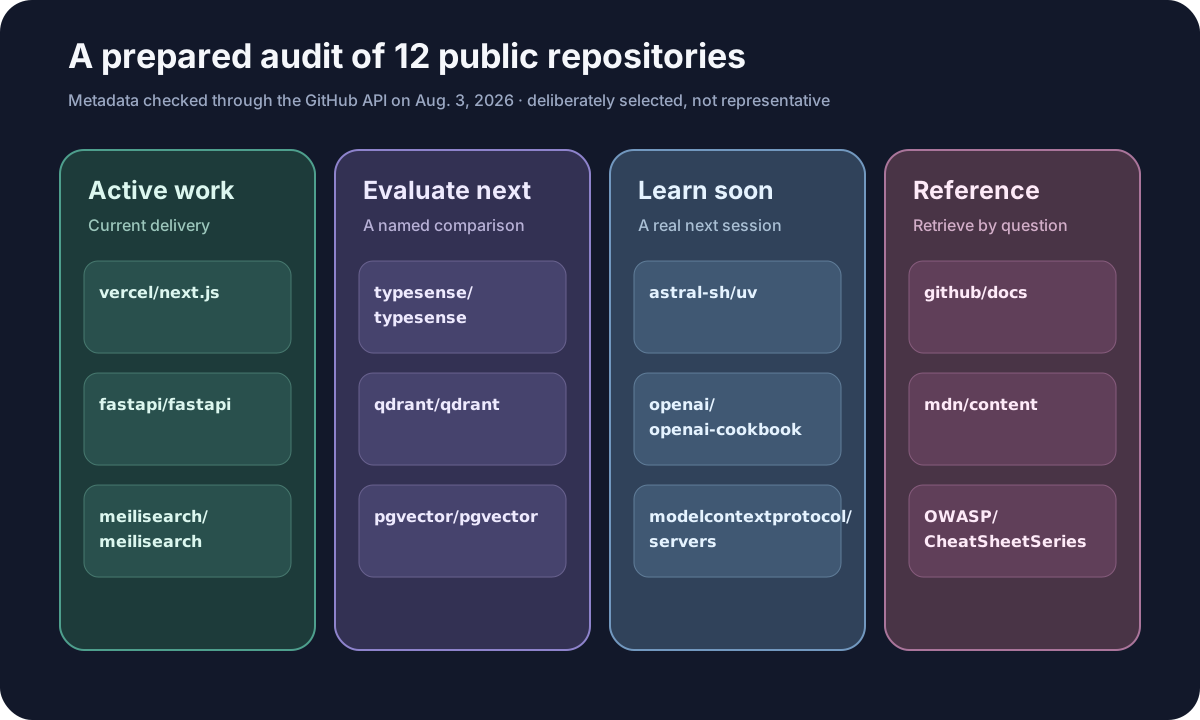
You can download the API snapshot and editorial decisions. The pushed_at values are a dated snapshot and will naturally change.
Two boundaries became visible in the audit.
First, language is a useful filter but a weak organizing principle. astral-sh/uv is a Python package manager whose primary repository language was reported as Rust. openai/openai-cookbook was reported as Jupyter Notebook. A person can remember the use while GitHub filters expose the implementation.
Second, similar jobs cross languages. Meilisearch, Typesense, Qdrant, and pgvector are not interchangeable, but all can appear during research about search infrastructure. Sorting them by star count or language does not record the requirement being evaluated. A List called “Evaluate search for project X” would preserve the decision, but the public-list boundary makes “Evaluate search” a safer name; keep confidential requirements in a private note.
The observable result was not a perfect classification. It was a smaller active layer and a specific retrieval sentence for each reference. That is enough to prevent the original stars page from becoming mandatory cleanup work.
Decide when to unstar
Removing a star is not the only way to finish with a repository. The star may still represent appreciation or general interest after it leaves a working List.
Unstar when the repository is a duplicate save, a mistaken click, a superseded fork you no longer want, or something you would not choose to see again. Keep the star when the interest remains but no active decision exists. Deselect a List when the work ends.
Avoid a blind mass-unstar operation. A script that changes hundreds of account actions concentrates the cost of a wrong filter or token. If you need an export before a large review, GitHub’s starring API documentation describes authenticated and public-user endpoints, pagination, and a media type that can include the time a star was created. Treat an API export as a backup or analysis input, not as permission to automate removals.
Deleted, renamed, private, or archived repositories also need adaptation. A renamed public repository may redirect, while a deleted or newly private repository may no longer be recoverable from a saved URL. A star, List, or bookmark is not a source-code backup. Fork or archive code only when you have the rights and a genuine preservation requirement.
Where Nodus Vault can add the missing context
Nodus Vault does not import or synchronize GitHub Stars or Lists. Use it for selected public repositories whose reason matters beyond the star.
When you save a bare public repository URL, the current Nodus workflow can attach repository metadata and, when GitHub makes it available, searchable README content. Search can also use your private note, the repository or owner, description, saved text, and meaning. That makes a clue such as “compare typo-tolerant search for the catalog” more useful than relying on typesense/typesense coming back to mind.
Issue and pull-request URLs do not receive the same repository-specific enrichment. They can still be saved as ordinary pages, but do not expect the bare-repository metadata view. Nodus also does not clone code or preserve a repository that later disappears.
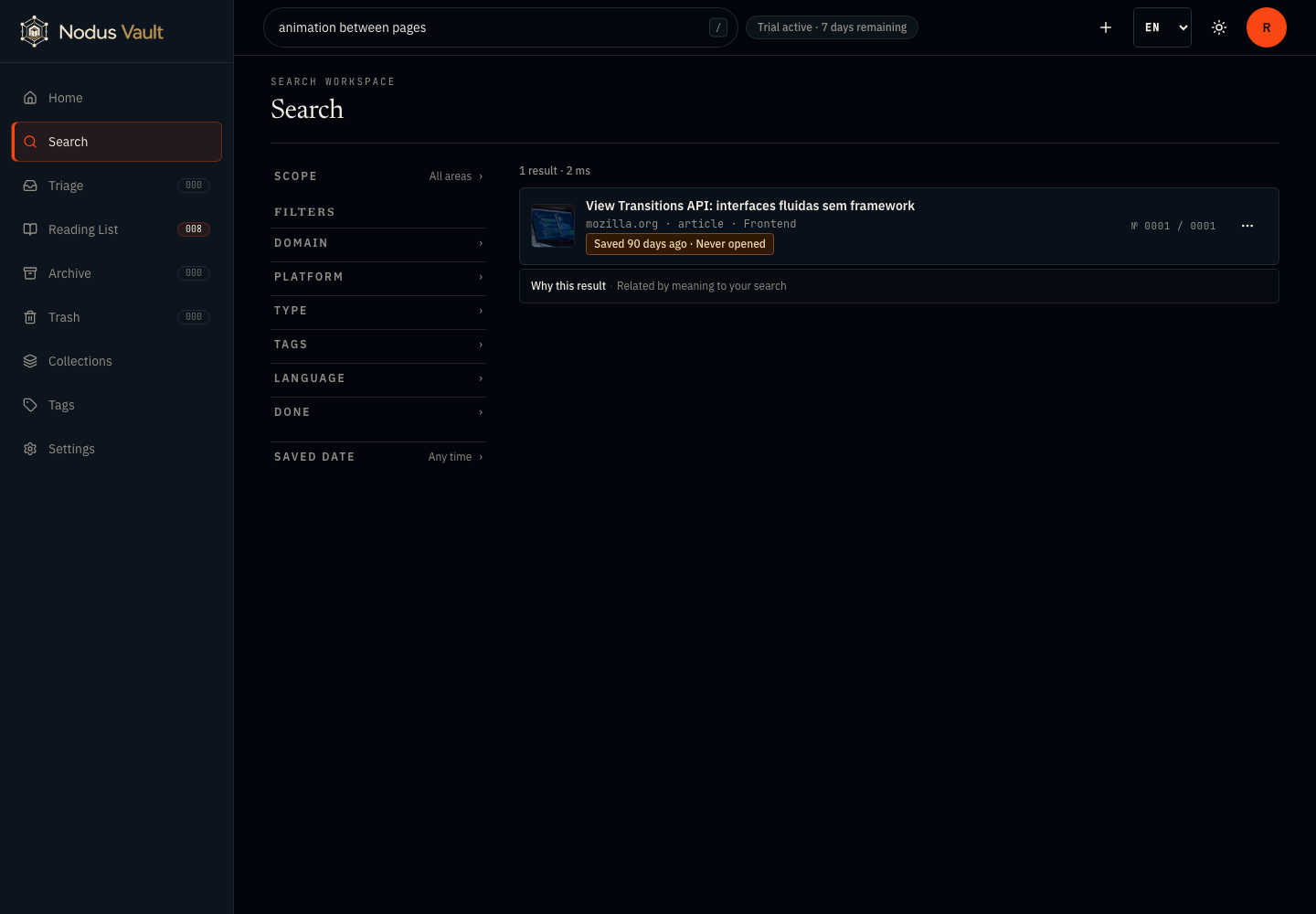
The screenshot is a prepared product demonstration captured on July 21, 2026. It shows the current search behavior with a saved documentation page, not a GitHub Stars import or a benchmark of repository retrieval.
If your real problem is broader than GitHub, the guide to turning research links into reusable references explains what context to preserve around a source.
A useful first 15 minutes
Create two or three public-safe working Lists. Review one screen of recent stars. Put only current decisions into those Lists. For one repository whose name you are likely to forget, write the question that made it useful and save that note with the link.
Then search for it later using the clue, not the repository name. That successful return is a better test than how many stars you managed to classify.
Save one important public repository in Nodus Vault with the reason you expect to remember. The rest of the stars can stay where they are.