

Bookmark organization
Tags vs. Folders for Bookmarks: A Practical Way to Choose
Choose folders, tags, or search by the job each bookmark must do. See a reproducible 24-link exercise and a lighter hybrid system.
The short answer: organize by the next job
Use a folder or collection when a group of links belongs to one stable context: a client project, a course, a trip, or the small set of pages you open every week. Use tags when the same link needs to appear through more than one lens. Use search when you are more likely to remember an idea than the place where you filed it.
That means you do not need to choose one system for your entire library.
The useful question is not “Are tags better than folders?” It is “What route back to this link will still make sense later?”
| If the link is… | Give it… | Example |
|---|---|---|
| Part of one active project | A project folder or collection | Sources for a pricing-page redesign |
| Useful across several projects | One or two retrieval tags | accessibility, onboarding |
| A destination you open repeatedly | A visible shortcut | Calendar, issue tracker, deployment console |
| Unfinished reading | A reading queue, not a topic folder | A long report you intend to read Friday |
| Long-term reference | Reliable search; optional context | API documentation or a research paper |
This answer sounds modest because it is. A bookmark system fails less often when it asks you to make fewer predictions about your future memory.
Why folders and tags solve different problems
A folder gives a link one address inside a hierarchy. That is valuable when location itself carries meaning: Clients / Acme / Launch, for example. You can browse the path even if you do not remember the page title.
A tag gives a link a label without requiring one exclusive home. The same article can be about accessibility, forms, and checkout. Firefox, one of the browsers that supports both models, describes tags as keywords that can be reused and searched, while folders remain the browsable hierarchy in the bookmark library. Mozilla’s current bookmark-tag documentation shows the two structures coexisting rather than replacing each other.
Research does not support a universal winner either. A study comparing hierarchical and tagging interfaces for web bookmarks found that the organizer and the amount of classification support changed how participants saved material. Its sample was 95 ninth-grade students completing a research task, so it should not be stretched into a rule for every adult knowledge worker. The original study is more useful as evidence that the interface changes behavior than as a verdict.
An earlier hands-on comparison of folders and labels likewise found strengths and weaknesses in both models and argued for combinations that preserve the useful parts of each. That exploratory study matters because it resists the tidy claim that one structure has made the other obsolete.
Folders are good at stable boundaries
Folders work well when all three statements are true:
- the group has a clear name;
- membership is reasonably stable;
- you expect to browse the group as a whole.
A travel plan is a good folder. So is a current client engagement. Six dashboards you open every Monday can live in one visible toolbar folder because the repeated path is the point.
Folders become expensive when the tree must answer several questions at once. Should a study about accessible checkout forms live under Research, Accessibility, Forms, or Client A? The folder can store it in one place, but your later memory may approach it from another.
Tags are good at overlap
Tags earn their place when they create a second useful route to a link. A paper inside the Checkout redesign collection may deserve accessibility because that label will still be useful in a different project.
The trouble begins when every attribute becomes a tag. Format, source, status, topic, author, year, priority, and mood can produce a detailed record that nobody wants to maintain. Tags also split quietly: user-research, ux-research, and research may describe the same future search unless someone keeps the vocabulary in shape.
A practical threshold is to add a tag only when you can name another situation in which you would deliberately retrieve it.
Search is good at imperfect memory
Neither hierarchy solves the moment when you remember “the article about animation between pages” but not its folder, tags, or title. Search is a separate retrieval route. It can use the words you remember, the saved page, your note, the source, or meaning—depending on the tool.
Search is not an excuse to keep everything. Pages disappear, extraction can fail, and vague notes remain vague. It does let you stop asking a folder tree to model every possible future thought. Our guide to finding a saved link without remembering its title goes deeper into that recovery problem.
We pressure-tested the choice with 24 links
On July 22, 2026, we ran a desk exercise with 24 public pages used in product and editorial work. The set included three frequently opened destinations, seven sources for the active article, four items waiting to be read, and ten long-term references.
We compared three structures:
- Topic folders only: each link had to receive one topical home.
- Tags only: every plausible topic and the next job became a tag.
- Selective hybrid: every link received a next job; the seven active sources joined one project collection; only eleven links that looked reusable across contexts received one extra retrieval tag.
We recorded four things: how many classifications the structure required, whether a link had more than one plausible topical home, whether its next job remained visible, and whether it could be reused outside the current project. We did not measure clicks, retrieval time, memory after several months, or user satisfaction.
| Structure | What we observed | What it exposed |
|---|---|---|
| Topic folders only | 16 of 24 links had more than one plausible topical home | A single location was cheap to record but forced an arbitrary choice |
| Tags only | 53 topic labels plus 24 next-job labels: 77 recorded labels | Overlap survived, but every distinction became maintenance |
| Selective hybrid | 24 next jobs, 7 project memberships, 11 retrieval tags: 42 classifications | The active work stayed visible while most reference links remained searchable |
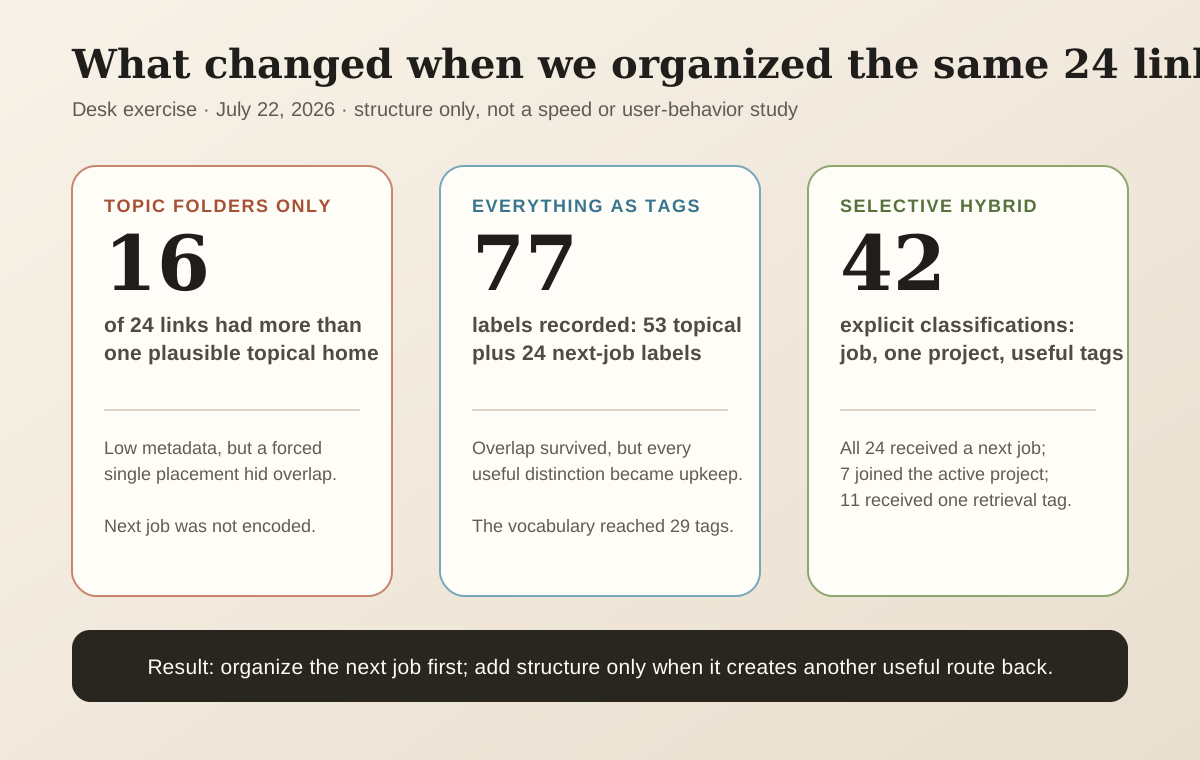
You can inspect the 24-link classification sheet used for the exercise. The folder candidates and tags are editorial judgments, not ground truth. We deliberately included cross-cutting material, so this small set probably creates more ambiguity than a library made mostly of recipes or daily destinations. The exercise tests the framework’s internal cost; it does not prove that the hybrid retrieves links faster for everyone.
That limitation is important. The useful result is not “42 beats 77.” The result is that classification work fell when we stopped encoding every property and first recorded what should happen next.
The hybrid rule that survived the exercise
The most durable sequence was:
- Decide the next job. Is the link for repeated access, an active project, unfinished reading, or reference?
- Create a collection only for a real boundary. A project with a beginning and an end qualifies. “Interesting things” does not.
- Add a tag only for another retrieval path. If you cannot imagine using the tag to find material across contexts, skip it.
- Let search carry uncertain recall. Do not recreate every remembered phrase as taxonomy.
Three links from the exercise show why the order matters.
The Google Calendar link was a frequent destination. It needed visibility, not planning, calendar, work, and weekly tags.
The Firefox page about bookmark tags was evidence for this article. Its next job was “current project,” so project membership mattered first. Giving it a permanent tags label would only be useful if we expected to retrieve it for another piece about classification.
The MDN page about the View Transition API was a long-term reference. It could reasonably fit Frontend, Browser APIs, and Animation. Instead of choosing the perfect home, keeping it searchable and adding animation only when that route proved useful preserved the link without designing a miniature library around it.
Build the system without reorganizing your whole archive
Do not start by dragging 2,000 old bookmarks through a new tree. That creates a large cleanup project before the new system has earned your trust.
Preserve an exit route first
Export the browser library before a large reorganization. Chrome and Firefox both provide an HTML export path; follow the documentation for your current browser rather than an old screenshot from a blog. Chrome’s import and export instructions and Firefox’s export instructions describe the current controls.
Open the exported file and sample links from several folders. A backup that exists but has never been checked is still an assumption.
Define four jobs, not forty subjects
Start with repeated access, current project, read/watch, and reference. Your names may differ, but each category should lead to a different action.
This is the same distinction behind bookmarks versus reading lists: a link you plan to consume is unfinished work; a reference only needs to be recoverable when a real need appears.
Move only what is alive
Bring over the pages you opened this week, the project currently on your desk, and the small reading queue you honestly expect to use. Leave the rest in the backup or import it as searchable reference without assigning every item a new home.
This is not neglect. It is a way to let use reveal which structure is worth maintaining.
Add tags on the second useful encounter
The first time you save a link, you are guessing about its future role. The second time a theme matters across projects, you have evidence. Add the tag then.
If you keep needing accessibility material across design, engineering, and content work, that tag has earned maintenance. If interesting never guides a real search, it has not.
Test retrieval with the memory you actually have
Choose five older links and look for them without using their exact titles. Try the project, a remembered idea, the source, and a tag. Where retrieval fails, fix the route—not the whole library.
For research material, a short note about why a source matters often does more than another category. The worked method in turning research links into usable references shows how to preserve that context.
When this approach needs to change
A selective personal system is not enough for every library.
Teams may need a controlled vocabulary so two people use the same label. Regulated work may require a fixed filing policy, retention rules, or records that search cannot replace. A visual asset collection may depend on thumbnails and boards more than text retrieval. A browser-only library may need folders because they are the most portable structure across the tools involved.
The hybrid also fails if “searchable” is treated as “safe forever.” A stored URL is not an offline archive. The page can change or vanish. Preserve licensed files or snapshots separately when the content itself—not merely the route back—must survive.
And some libraries are small enough that none of this is necessary. If twelve visible bookmarks cover your recurring destinations, a toolbar folder may be the complete answer.
How the decision maps to Nodus Vault
Nodus Vault follows the same division of labor: collections can hold project links, tags are optional, and suggested tags do not change the library until you approve them. Search covers titles, descriptions, saved content, notes, tags, sources, and meaning, so a reference does not need a perfect folder path to remain recoverable.
That product design is not evidence that the hybrid is universally superior. It is one implementation of the trade-off described here. You can still overbuild collections, approve tags you never use, or save material without enough context.
If your browser library has already outgrown its folder tree, you can export it, import the HTML file into Nodus Vault, and let the links enter Triage before deciding which ones deserve a project, a reading queue, or no further attention.
Keep one rule
Give each link the smallest amount of structure that creates a believable route back.
A stable path deserves a folder or collection. A useful overlap deserves a tag. An uncertain memory deserves search. Everything else can wait until use proves that the extra work is worth it.